May 23rd, 2010
•
vim •
View Comments
So you have your favourite tabbing convention, but you’ve ended up with some files in some other convention, for example tabs instead of 4 spaces. If you use Vim and already have it set up to your liking, the :retab command will replace indents in the current buffer with those matching your convention. It’s a bit tedious to do this manually for each file, so if you trust Vim not to make a mistake (or you’re using version control) you can use a bit of scripting-fu to make it easier:
for F in *.{c,h}pp ; do vim -c ":retab" -c ":wq" "$F" ; done
April 23rd, 2010
•
linux, ubuntu •
View Comments
For ergonomic reasons (discussed previously) I like a side button on my mouse to act as a middle button instead. Unfortunately there still doesn’t seem to be an “easy” way to remap mouse buttons in Linux, and what’s more the method of changing such settings seems to keep changing. To achieve the same results in Ubuntu Lucid, I added an Xorg configuration fragment at /usr/lib/X11/xorg.conf.d/20-logitech-mx1100.conf:
Section "InputClass"
Identifier "Logitech MX1100 button remap"
MatchProduct "Logitech USB Receiver"
MatchDevicePath "/dev/input/event*"
Option "ButtonMapping" "1 2 3 4 5 6 7 2 9 10"
EndSection
As with the previous method, xinput list should give you the product string to use for MatchProduct.
April 17th, 2010
•
gnome, ubuntu •
View Comments
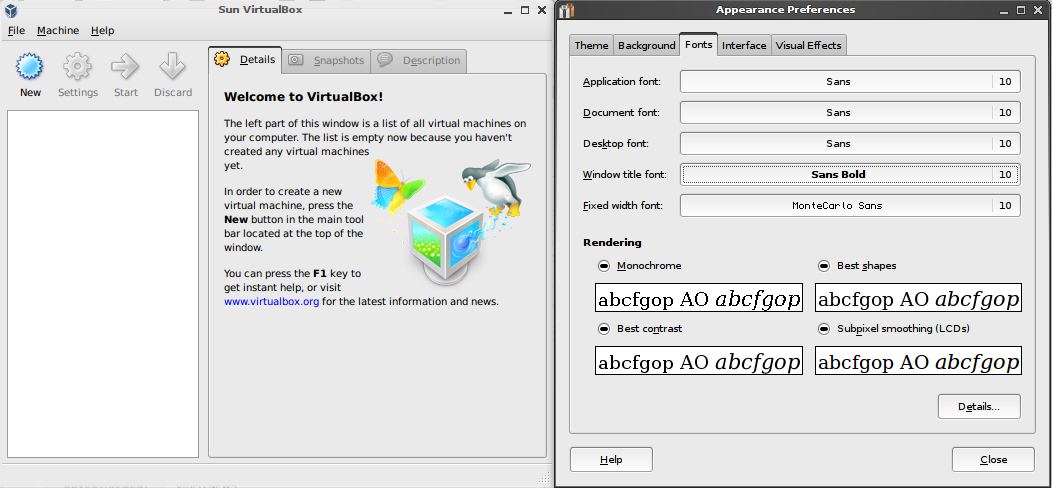
So far every time I’ve used Qt applications under GNOME, especially VirtualBox, I’ve found the Qt font rendering to be appalling. See this screenshot of VirtualBox alongside the GNOME appearance dialog:

As you can see, most of my font settings are at the default “Sans” font. The “Sans” and “Sans serif” fonts , at least in recent Ubuntu releases, refer to the corresponding DejaVu font variants (previously it was Bitstream Vera). However as I found out through experimentation, whilst Qt is obeying my font settings, the generic “Sans” font seems to mean something completely different (at least to Qt4). If I instead specify the DejaVu fonts directly in my font settings, the correct font rendering is used:

So that’s it: if you’re using GNOME and you seem to get a Qt font rendering that doesn’t match your GTK font rendering, try using a more specific font. (Note: I haven’t got a clue what “Sans” actually means to GNOME, but it doesn’t appear to be a font in it’s own right.)
July 8th, 2009
•
php •
View Comments
Yesterday I found out first-hand how using a dynamically typed language can get you into trouble in unexpected ways whilst writing unit tests for CSF (my PHP framework).
Read the rest of this entry »
June 23rd, 2009
•
.net, java, windows •
View Comments
It’s been no real secret that the .NET CLR (Common Language Runtime) has been Microsoft’s answer to Java. Garbage collection, bytecode compilation, large set of core libraries, it’s all there. But there is a problem that I’ve encountered recently: distribution size and install base.
A fairly clean Windows XP machine is fairly certain to not have anything higher than .NET 1.x installed. Anything really compelling in the .NET framework requires 3.5. This means somehow you need to get version 3.5 onto the machine somehow. This isn’t a problem in Windows Vista and later, which include the framework. Microsoft’s answer to simple deployment is it’s “ClickOnce” system, where an application automatically installs .NET from the Internet (if necessary) before installing itself. Sure, it’s a 60MB download, but it only needs to be done once.
The real issue is when you can’t guarantee an Internet connection or a working .NET 3.5 installation. At this point you must resort to the offline installation, and this is where .NET and Java are very different. For Java 1.6 SE, the offline installer is 16MB for Windows 32-bit. For .NET 3.5, the offline installer is a 200MB universal package, with no way to cut out the parts you don’t need. Java in fact is so small relatively speaking that many applications actually include the JRE in their package (for example OpenOffice – 148MB with JRE vs. 134MB without), whereas .NET can turn a 10MB application into a 210MB monstrosity.
Now in my particular situation, I’m embarassed to have chosen to use C#/.NET/WPF for a simple tool at work. For programming the tool itself, it was certainly the fastest option – other kinds of Windows programming, e.g. MFC or Forms, just look painful, and I thought the barrier to entry would be lower than Java. However this 1MB tool requires the 200MB .NET offline installer to be carted around with it because the network it’s used on is completely separate from the Internet.
.NET will only be really appealing once it’s ubiquitous, but then “critical mass” is one of the big problems for lots of software. For now, I think I’m going to try Java next time…
June 13th, 2009
•
linux •
View Comments
I’ve had a Logitech MX1000 mouse for a few years now, and the two most important features for me have been the ergonomic build and the few extra buttons. Something I’ve always found with many-buttoned mice is that the side button closest to the thumb is a much more ergonomic way to “middle click” than the actual middle mouse button—it’s a much more natural motion. Middle clicks are quite useful these days, especially with them being a standard way of closing tabs (and opening them in browsers), and having such a popular button perched on a rocking and rolling peak is far from ideal.
Since I’m primarily a Linux user, I don’t have Logitech’s own SetPoint software at my disposal, so I’ve always had to find a way to get this functionality in some other way. When I first got the mouse, this method involved deliberately using a “basic” mouse driver (referred to in xorg.conf as “IMPS/2″), which didn’t support many mouse buttons. The effect was that the button mappings wrapped around, leaving button 8, my preferred “middle click”, mapped to button 2 (8 mod 3), the real middle button.
Unfortunately, newer Xorg versions became smarter and better capable of handling more buttons, and this workaround ceased to function. For the next while, I used something even more hackish: xbindkeys combined with xmacroplay to simulate a middle click with the following part of my .xbindkeysrc:
"echo ButtonRelease 8 ButtonPress 2 ButtonRelease 2 | xmacroplay -d 0 :0.0 &"
b:8
The downside to this solution is that there are some cases where the button events don’t work correctly, one of them being open-in-tab from a bookmark menu in Firefox. It seemed the best solution would be to get Xorg to remap the buttons in such a way that button 8 really was just an extra button 2. The “xinput” utility lets you set button maps in this way—this wiki entry shows how to remap mouse buttons (even if for a different purpose).
This method worked fine, and I put it in my startup programs for GNOME, but it didn’t persist after suspend/resume. It appears that when resuming, USB devices get “reattached”, and therefore don’t keep the settings applied to them the last time they were attached. The workaround for this is to set a policy using a HAL (Hardware Abstraction Layer) .fdi file. These files live in /etc/hal/fdi/policy (at least they do on Ubuntu) and allow you to set various properties on input devices. This page on the Ubuntu wiki gave me the recipe I needed to remap buttons based on the device name. I ended up with the following .fdi file (which I saved at /etc/hal/fdi/policy/logitech-mx1000.fdi):
<?xml version="1.0" encoding="UTF-8"?>
<deviceinfo version="0.2">
<!-- Remap Logitech MX1000 buttons so that the most accessible side button
acts as a middle button -->
<device>
<match key="info.product" string="Logitech USB RECEIVER">
<merge key="input.x11_options.ButtonMapping" type="string">1 2 3 4 5 6 7 2</merge>
</match>
</device>
</deviceinfo>
Now, whenever my Logitech mouse is connected, it gets the buttons remapped—this includes when resuming from suspend. Problem solved… until things are changed again of course!
June 10th, 2009
•
web 2.0 •
View Comments
A recent Lifehacker story about a Greasemonkey script to remove quiz stuff from Facebook made me realise something: you know your site is too “web 2.0″ when users are going out of their way to remove features. A quick search on Userscripts.org reveals that a substantial proportion of the Facebook-related scripts are either for removing features or auto-playing game applications.
I feel that Facebook started off pretty well. The initial target audience seemed to be students, and that’s what most of the users were. It was friendly and uncluttered, compared to other social networking sites like MySpace. This spread to a wider audience, first sucking in kids and then adults. This was less than ideal for some, the idea of their parents on a social networking site being horrifying, but still not a disaster.
But in the midst of all this, the apocalypse happened: a powerful API which allowed other people to extend the functionality of Facebook by creating applications that people could add to their account. Gradually users became innundated with an unstoppable torrent of application requests, caused by application developers making the “tell all your friends” step seem (or be) necessary to using their application. The average user’s profile became a mess of applications competing for screen space. The target audience became those who have the time to play endless Flash games, answer endless quizzes, and generally clutter the “requests” page of their friends.
And so Facebook became MySpace 2.0—gaudy and cluttered, with infinite ability to add more clutter. Maybe the lesson learned is that the moment you allow anything “shiny” in a social networking site, your demographic will degenerate to schoolkids who want to fill their profiles with as much of it as possible.
Personally, I’ve reduced my Facebook interaction for the past 2 years to having the site email me when anybody says something directly to me either via message or on my “wall”. There is just too much clutter now for me to wade through the endless application requests, friend requests from people I don’t know, and news feed items generated by the latest viral quiz. And maybe pictures of friends getting drunk have lost their novelty value…
May 17th, 2009
•
css •
View Comments
When re-theming DokuWiki to fit in with the general look-and-feel of this blog, I thought it would look good to have buttons with images relevant to what they did. Having created the necessary, CSS, I subjected it to my multi-browser test bed (actually a Windows XP virtual machine with the latest versions of the top 5 browsers running in it). The CSS I used was along the lines of this:
div.dokuwiki form.btn_show .button {
padding: 1px 0 1px 16px;
background: transparent url(images/page.png) 0px 1px no-repeat;
border: none;
}
One thing that became apparent is that IE7 has absolutely no idea how to render this. The correct rendering (as produced by Firefox 3 and all the other browsers) is this:

IE7′s take on rendering this looked more like this:

After a bit more experimentation, I came up with the following illustration which roughly shows what is happening:

The nice thing is that this is fixed in the upcoming IE8, so I’ve taken the stress-free approach; since it’s a relatively “minor” visual bug, there’s no sense it tearing my hair out trying to make it render correctly everywhere. On this occasion I’ve decided that people can either deal with the fact their browser is behind the times, or upgrade, or wait for the upgrade to happen for them.
May 13th, 2009
•
politics, python •
View Comments
A dominating story in the news recently has been that of UK Members of Parliament “abusing” the expenses system. As part of this, expense claims data has been released to the public, but unsurprisingly not in a simple CSV format that just anybody can play with. All I could find were PDF files and news sites representing the data in their own way.
This led me to wonder how easy it would be to “scrape” the data from one of these sites. Having heard about BeautifulSoup, a Python HTML “tag soup” parser, I opened up an interactive Python session and started to play with the data from this BBC News page. Luckily for me, the BBC page’s HTML isn’t too ugly, so figuring out how to get the data rows wasn’t that hard.
The end result is the following Python script which scrapes the data from the BBC News page and saves it in both CSV and JSON formats.
mp-expenses-extract.py (2.3 KiB, 235 hits)
mp-expenses.csv (58.8 KiB, 256 hits)
mp-expenses.json (226.8 KiB, 217 hits)
May 11th, 2009
•
View Comments
Browsing the visitor stats today, I found this little gem:

“Mozilla/1.22 (compatible; MSIE 2.0; Windows 95)”? Who uses such a browser? My bet is on it being a zombie machine that somebody has completely forgotten about, which would explain the several other hits I have from versions of IE before 5.0… These visitors turn up, hit the same page repeatedly, and then leave. Unfortunately I deleted my spam before seeing this, otherwise I’d be able to verify this theory. Maybe I’ll look more closely next time.